

The development environment now features a conversational AI companion.

The environment can also perform any project-related tasks you can think of: "Generate a query that selects the customers in a given state", "Create a data file to store orders", "Set all variables to uppercase", etc.
The AI companion can:
You can make all these requests using natural language.
Your conversations are saved by project. Even if you close the environment, you will still find all your conversations.
Your conversations are personal and are stored on your computer. This means you can come back to a specific subject at any time.

The Pivot Table control displays cross-referenced data from different files in a database.
Some examples include: sales by product family, by product, by region, over time, with or without details.
The Pivot Table performs all the calculation itself. All the data is dynamically calculated and displayed.
Note: The Pivot Table control is also known as "ROLAP cube".
Creating a Pivot Table control in WEBDEV 2026 is remarkably easy. Simply answer a series of questions in the wizard to define the data to be displayed.
This control is also populated automatically, no code required!
The WEBDEV 2026 ROLAP engine automatically reads the data and performs the necessary calculations for all the possible levels of detail. It automatically populates the row and column headers.
End users can choose the desired level of detail. Rows and columns can be expanded and collapsed as required.
The displayed result can be exported to Excel, Word, PDF, etc., as with any other table in WEBDEV.
The Excel export functionality is widely used for simulations.
The end user may ask to compare a given period to the same period of previous years. This comparison is available in one of the context menu options.
For example, users can compare sales in October 2025 with sales in October of the previous two years.
Percentages and differences are calculated and displayed automatically.
Data theft is quite common. Large volumes of data are stolen every day around the world, then distributed or resold.
Don't take risks with the data from your applications.
Version 2026 introduces the new security audit.
This security audit detects flaws, unencrypted data, code risks and non-compliance with security standards.
In order to cover all aspects of security, the audit examines the project both statically and dynamically.

Issues detected by the security audit appear in the Compilation errors pane.
Detected issues are sorted by element (window, class, etc.).
The main verifications include:
The dynamic security audit detects issues both in test mode and on demand, when the application runs directly on the end-user device.
Detected issues appear both in the source code and in an aggregate list:
The main verifications include:
By simply using HFSQL and encrypting data using the automated features, you ensure a high level of security.
Other database systems don't offer these simple and flexible data encryption options.
With HFSQL, even illegal access to the server does not result in access to encrypted data.

Factur-X is a hybrid electronic invoice format combining a human-readable PDF with an integrated structured XML file, compliant with European standard EN 16931.
It is easy for users to read, while ensuring automated integration into accounting systems.
Factur-X was developed by the French non-profit association FNFE-MPE, and the German association FeRD.
Factur-X is based on XML files describing invoices according to extremely precise standards. This XML file is integrated into the invoice PDF.
The advantage is that Factur-X PDF file is both human-readable and machine-readable.
A Factur-X invoice implies:
Factur-X defines 5 data profiles (or levels) corresponding to use cases of increasing complexity. These profiles are:
Contains only essential data: invoice number, date, total amount, seller and buyer identification.
Adds totals excluding VAT, VAT by rate, but without line-by-line detail.
Adds billing lines (description, quantity, unit price excl. VAT).
Compliant with the full European standard EN 16931 with all required information (including order references, payment terms, deliveries, etc.). Mandatory for B2G exchanges in France and Europe.
Allows you to add additional sector-specific information (eg. healthcare, energy, etc.). At the time of printing, this profile has not yet been finalized by the association.
Version 2026 supports the 4 levels already defined.
The complexity of this XML file increases with the profile level.
The standard profile used today is EN 16931.
This file contains several dozen lines.
For example, for an invoice line, the corresponding code is:
<ram:SpecifiedTradeProduct>
    <ram:GlobalID schemeID="0160">598785412598745</ram:GlobalID>
    <ram:SellerAssignedID>ART_1254</ram:SellerAssignedID>
     <ram:BuyerAssignedID>REF5487</ram:BuyerAssignedID>
     <ram:Name>SUPPORT SERVICE</ram:Name>
     <ram:Description>Description</ram:Description>
     <ram:ApplicableProductCharacteristic>
       <ram:Description>CATEGORY</ram:Description>
       <ram:Value>DAY 8H-20H</ram:Value>
     </ram:ApplicableProductCharacteristic>
     <ram:DesignatedProductClassification>
        <ram:ClassCode listID="SK">SKU2578</ram:ClassCode>
     </ram:DesignatedProductClassification>
</ram:SpecifiedTradeProduct>
A ready-to-use internal component is provided. Simply integrate it into your project.
For each detail included in the invoice, call the internal component to generate the corresponding XML lines (with tags, etc.).
There is a property for every invoice detail: billing address, invoice line for an item billed by weight, invoice line for an item sold by unit, etc.
Each property expects parameters specific to the type of information it manipulates.
When the invoice is complete, simply call the GenerateXML method of the class provided in the internal component to create the XML file with the path to the PDF.
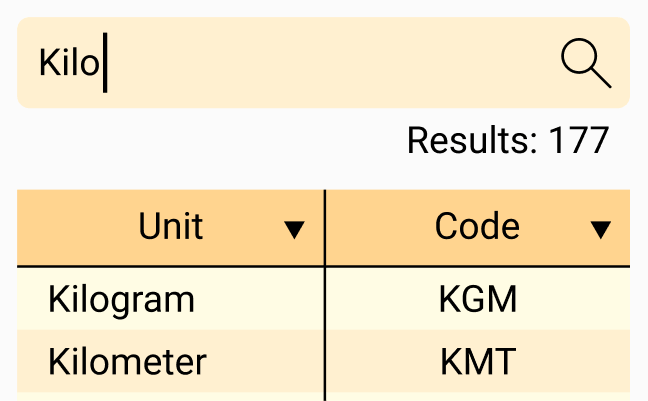
Choosing a standardized unit to use in Factur-X can quickly become difficult.
In version 2026, an intuitive wizard guides you through the selection of the standard-compliant unit, depending on the type of data to be transmitted.

Some organizations add a Factur-X logo for information purposes, to indicate that the invoice is hybrid (PDF + XML).
This logo can be inserted automatically in the report editor.
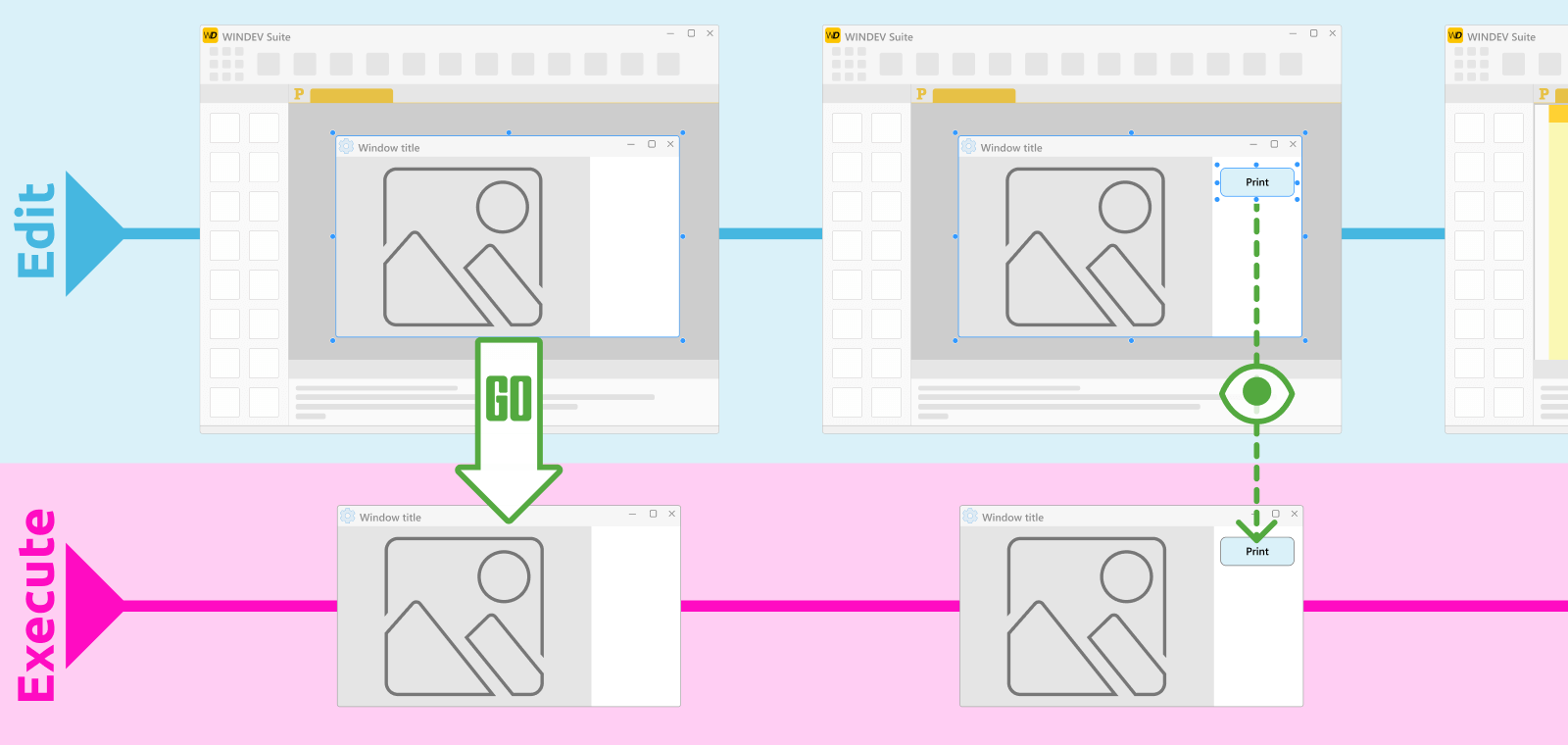
In version 2026, you no longer need to exit test mode to edit your UI.
Any changes made in the development environment are immediately reflected in your application in test mode:
This translates into massive time savings.
Question: What was the average amount of last month's invoices?
Answer: €320,789
The conversation can contain:
The AI Chat control lets users enter conversation elements.
It sends them to the model, retrieves the response and displays it as it goes along.
If the model requires an action, the AI Chat control will perform it.
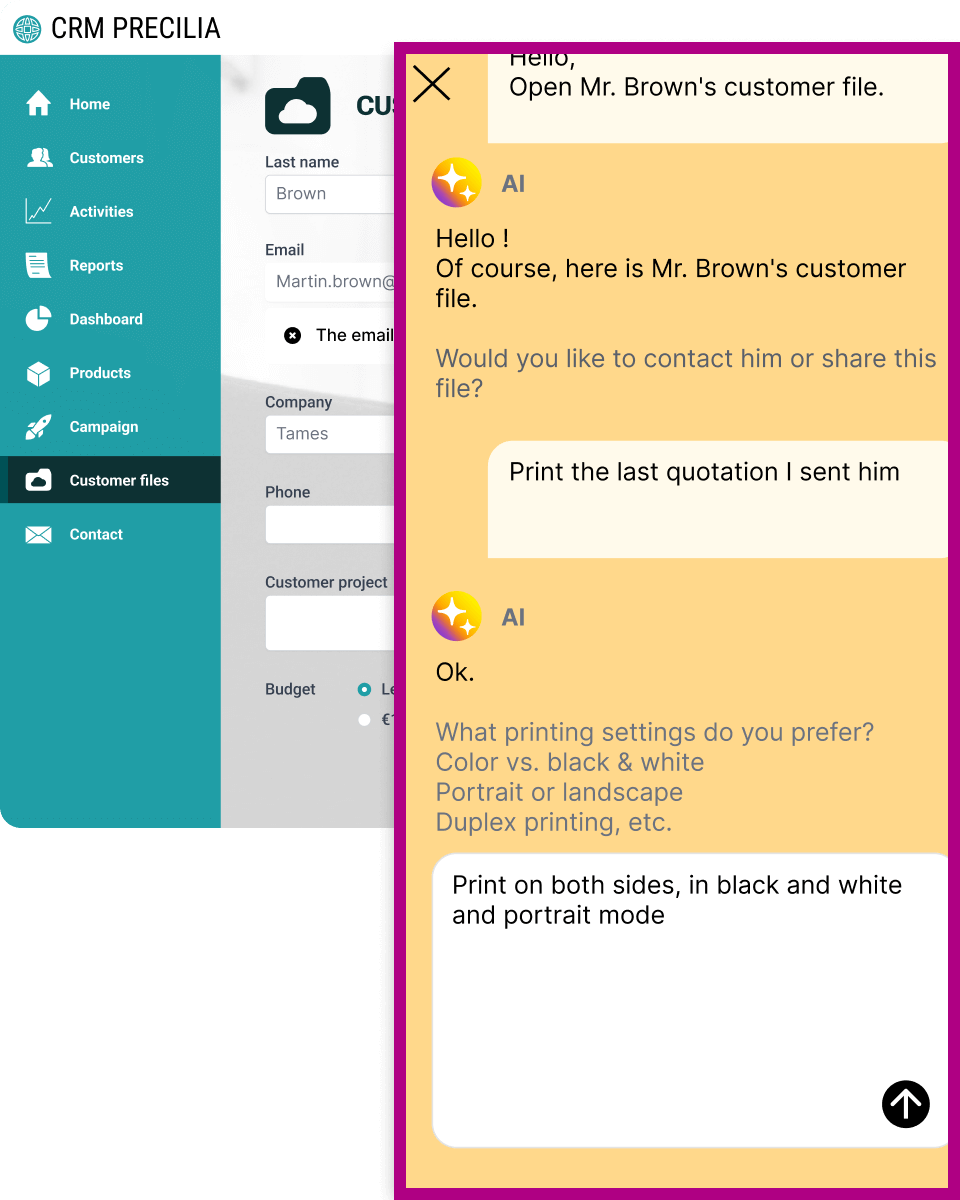
With the AI Chat control, you can choose the model that best suits your needs: Claude, Mistral, GPT, Gemini, OpenRouter, etc.
API account required: The AI Chat control works according to the model you specify. You must have an API account for the respective model provider in order to use the AI Chat control.
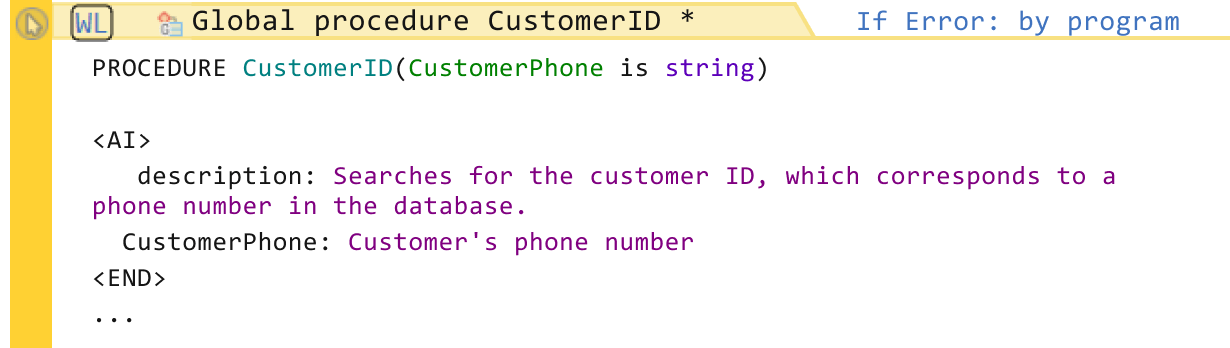
The AI Chat control can launch procedures from your applications.
To specify that a procedure can be used by the AI Chat control, simply indicate its desired action and parameters between the <AI> and <END> tags.
The new AI Chat control offers a host of built-in features:
The general principle of GraphQL is to make a single request to the web service, specifying all the data you want to retrieve.
The server returns all the data requested, structured in JSON format.
This offers a clear advantage, as you make one call instead of many. Performance is unmatched by any other type of web service.
A web service request could ask for:
With GraphQL, all these operations can be completed in a single call.
To easily use the returned values, the new WLanguage graphqlQuery type is introduced in version 2026.
This means that code completion is available when accessing the query result.
// Query declaration
customers_year_query is query = `
query CustomersByYear($year: Int!)
{
	ListCustomersWithRental(year: $year)
	{
		Last name
		First name
		Rentals
		{
			Yacht
			{
				Name
				Length
			}
			StartDate
			EndDate
		}
	}
}HFSQL 2026 introduces an incredible new feature: The ability to perform "semantic" searches, i.e. searches based on the meaning of text, rather than on the exact string.
This search examines text items or memos.
A new index format (.vex) has been added to HFSQL. It can be used without any adaptations, as it is natively supported by HFSQL.
For example, HFSQL 2026 makes it possible to search for "men's shoes" in a product database and find "shoes", "boots", "sneakers", "sandals", etc.
The FOR EACH instruction has a new syntax:
MAX_RESULT is int = 10
FOR EACH Product WITH SemanticSearch(
    Description, "men's shoes", MAX_RESULT)
    DisplayProduct(Product.ProductID)
END
No third-party modules required. Everything is integrated into the HFSQL engine.
HFSQL integrates an embedding model and a specific index adapted to semantic search.
No additional installations, no connection to external modules, no additional management. HFSQL does it all for you.
Creating a semantic index is easy. Simply declare a semantic index in the analysis, and indicate the text items to be indexed. That's it .
On existing databases, an "automatic modification" is run.
Thanks to semantic search, a user who enters descriptive terms that are not present in the stored text, such as "mid-season coat", can obtain relevant results covering all related products (jackets, windbreakers, thin parkas, etc.), even if these words are not present as such in the descriptions.
The engine interprets the user's idea instead of trying to match words.
Imagine a customer visiting an online store to find a lightweight jacket for spring, but not knowing the exact terminology.
"Mid-season coat"
Search results will only include:
items with a description that contains exactly "coat" and "mid-season".
The following are missing:
because the description of these products does not include the term "mid-season".
The search engine understands that the customer's intention is to find a lightweight outer garment suitable for mild or variable weather.
It also includes:
Even if the words don't appear in the product descriptions, the query will produce results that are relevant to the customer's needs.
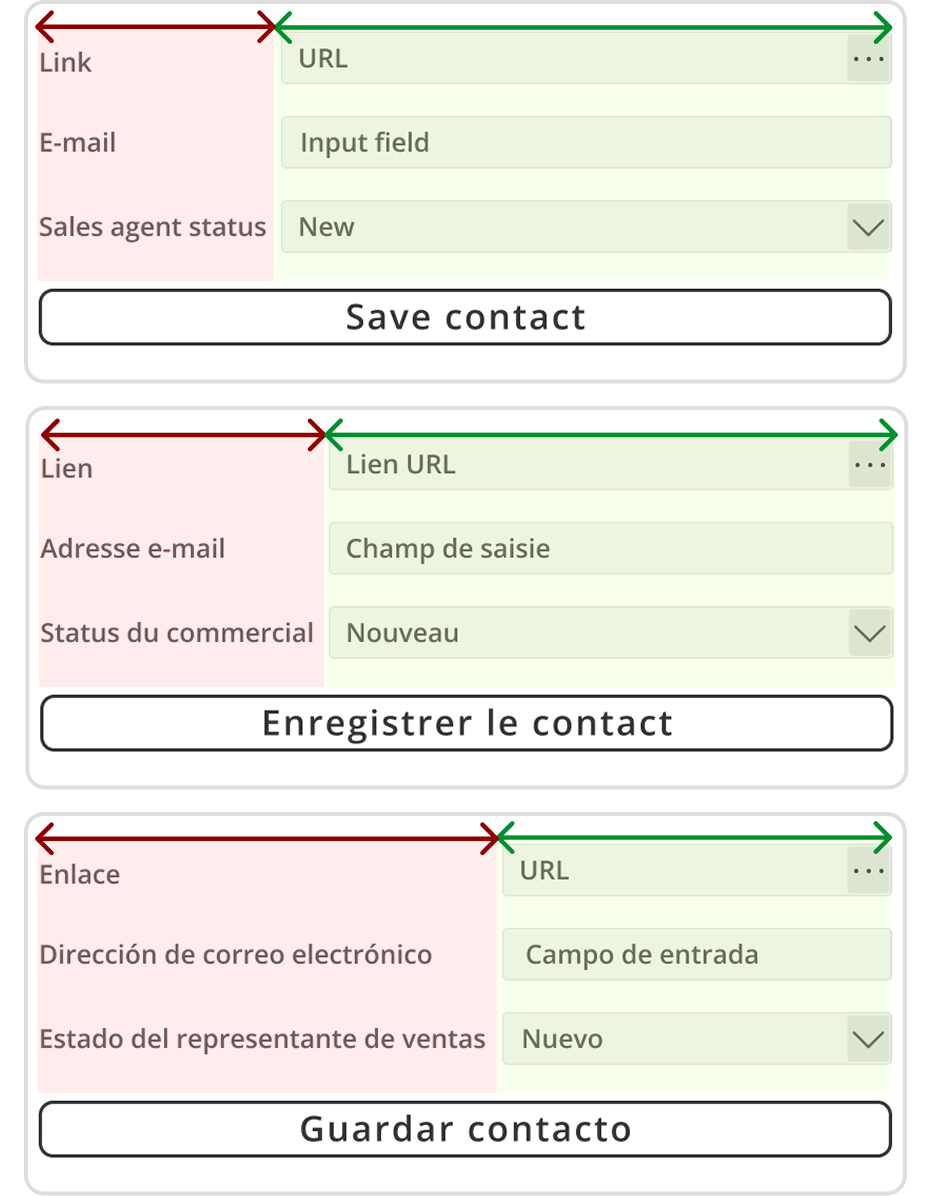
The Grid control is a relative positioning grid, available for WINDEV and WINDEV Mobile.
Align controls horizontally or vertically, without the need for pixel positioning.
Use nested containers to define the desired layout.
The grid starts simply as a series of rows and columns.
Simply define how these rows and columns will react when the control is resized:
Controls and containers are positioned in cells.
You can merge cells horizontally or vertically.
The Grid control is always in WYSIWYG mode. All changes are reflected immediately.
IU is built by nesting elements.
You can place a grid inside a grid, a grid inside a flexbox or a flexbox inside a grid. Any combination is possible.
Controls are positioned relative to the upper-left corner of their containing cell.
A cell can contain several controls.
You can define anchors for each control within a cell.
These anchors are relative to the cell size.
The size of the cell is determined by the row and column settings.
In addition to the visual editing mode, the grid can be edited programmatically:
For example, this makes it possible to hide one or more controls while preserving a perfect alignment.
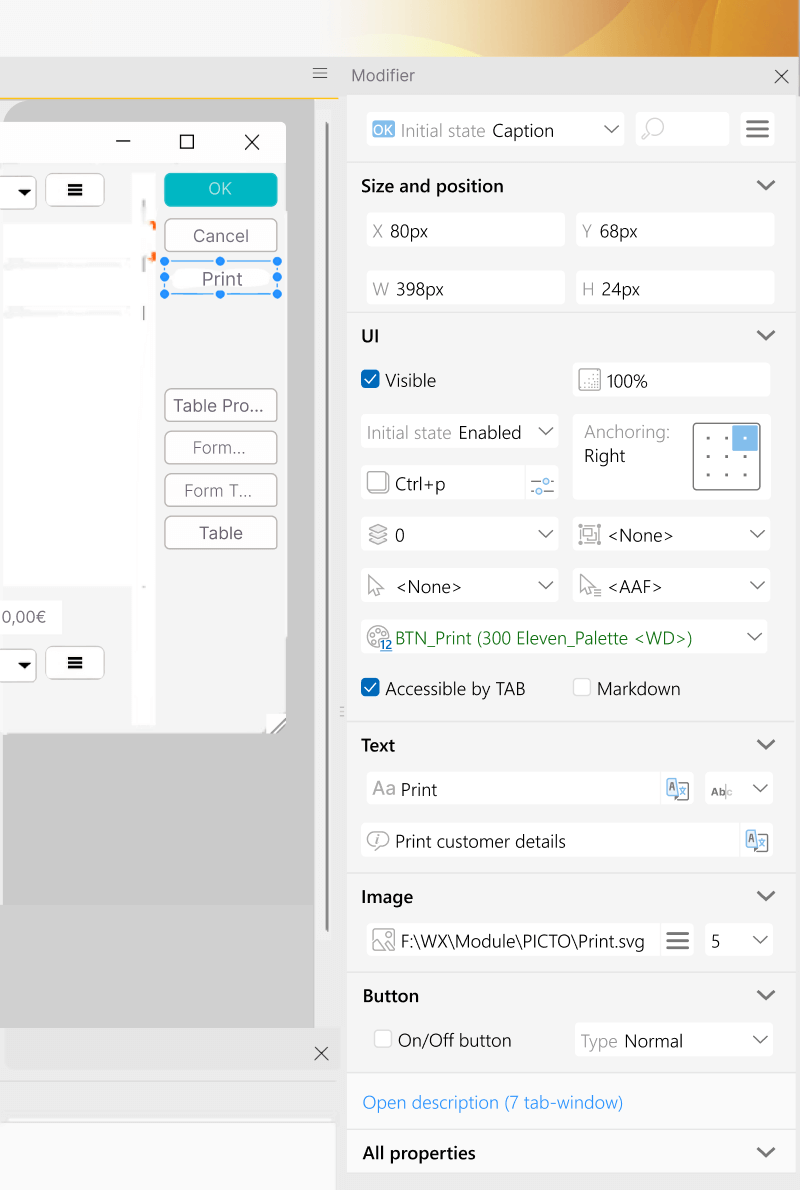
New information available, both when viewing and editing an element
For all controls
Image control and Window
A specific section allows you to view and select the image path and display mode settings.
Combo Box/List Box control
Check Box/Radio Button control
Table control
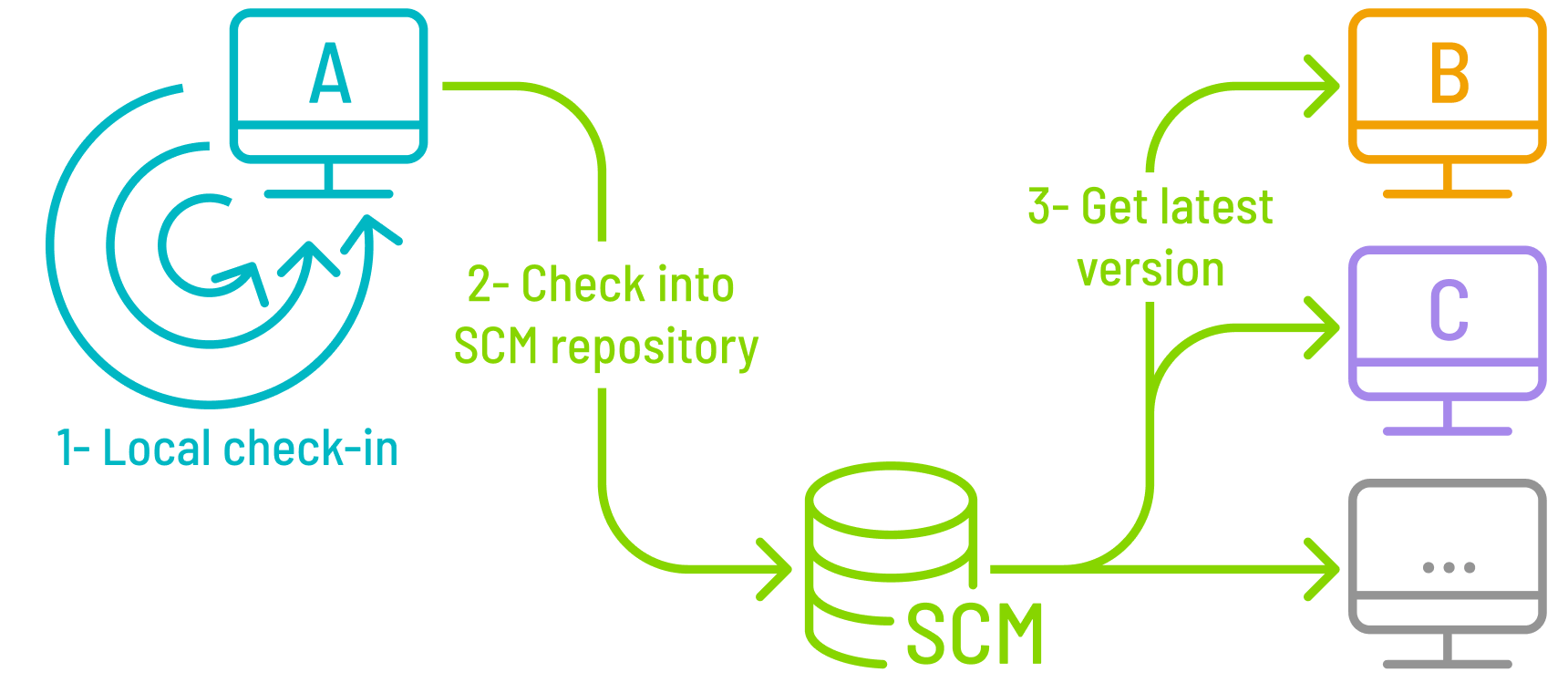
In a development team, elements are not checked into the SCM until the development of a functionality has been completed. This means that the elements under development are not available to other developers.
Until these elements are checked in, the developer has no access to history, and has no possibility of rolling any changes back.
Now, the SCM enables developers to create a local history.
This means that the history of changes made to an element can be saved locally, without being immediately synchronized with the central repository.
This new feature has many advantages:
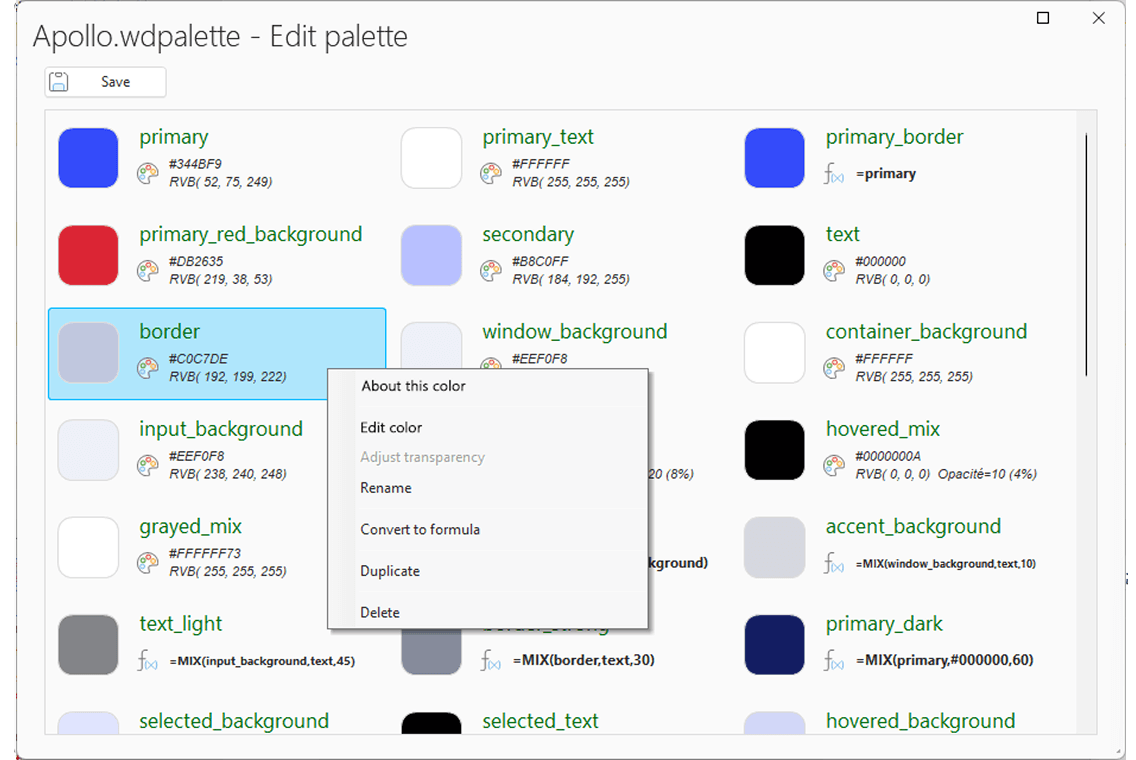
Color palettes were introduced in version 2025, allowing developers to easily create coherent UIs.
Palettes are interchangeable between skin templates.
Changing the palette (dynamically or statically) changes all the colors in a single operation.
The palette editor lets you create a palette from scratch.
To obtain a cohesive set of colors, the palette starts with a few dominant colors, which define the overall style.
Secondary colors are then derived automatically from these dominant colors, using a customizable formula.
It is also possible to manually define one or more secondary colors.
The intuitive UI of the palette editor reflects changes in real time.
The palette editor features an built-in test mode.
You can see a real-time preview of the color palette applied to the most frequently used controls.
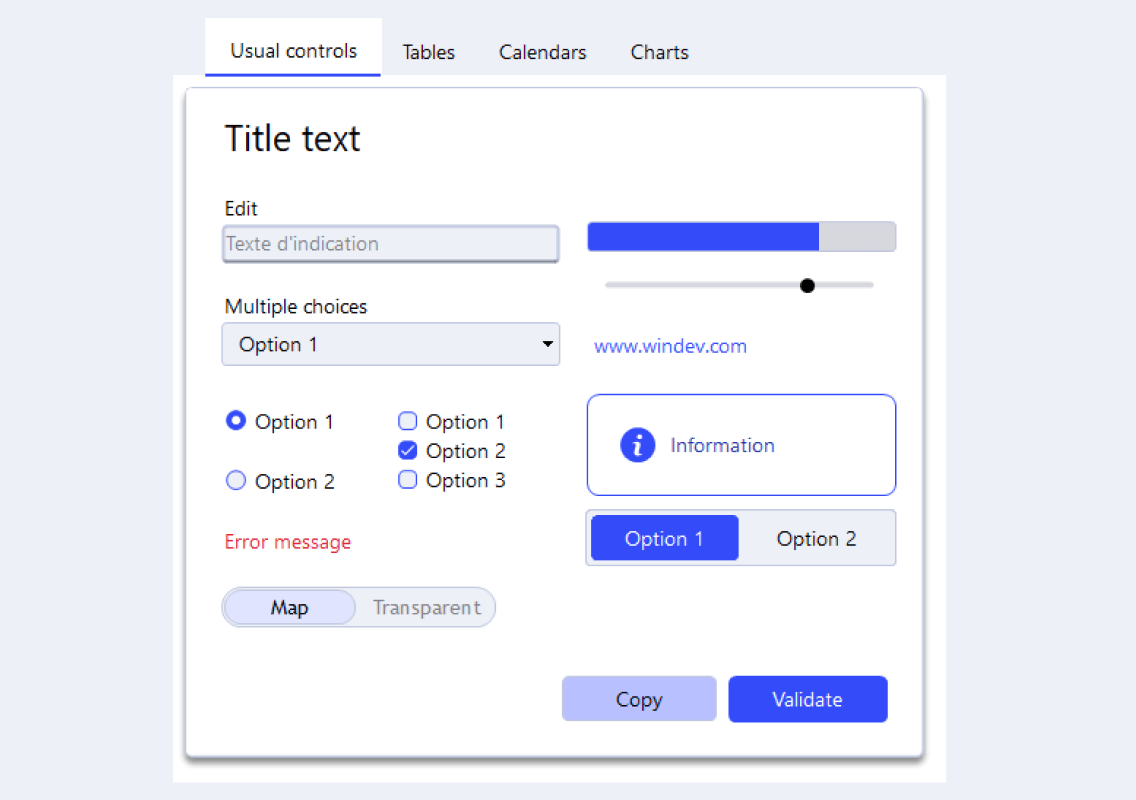
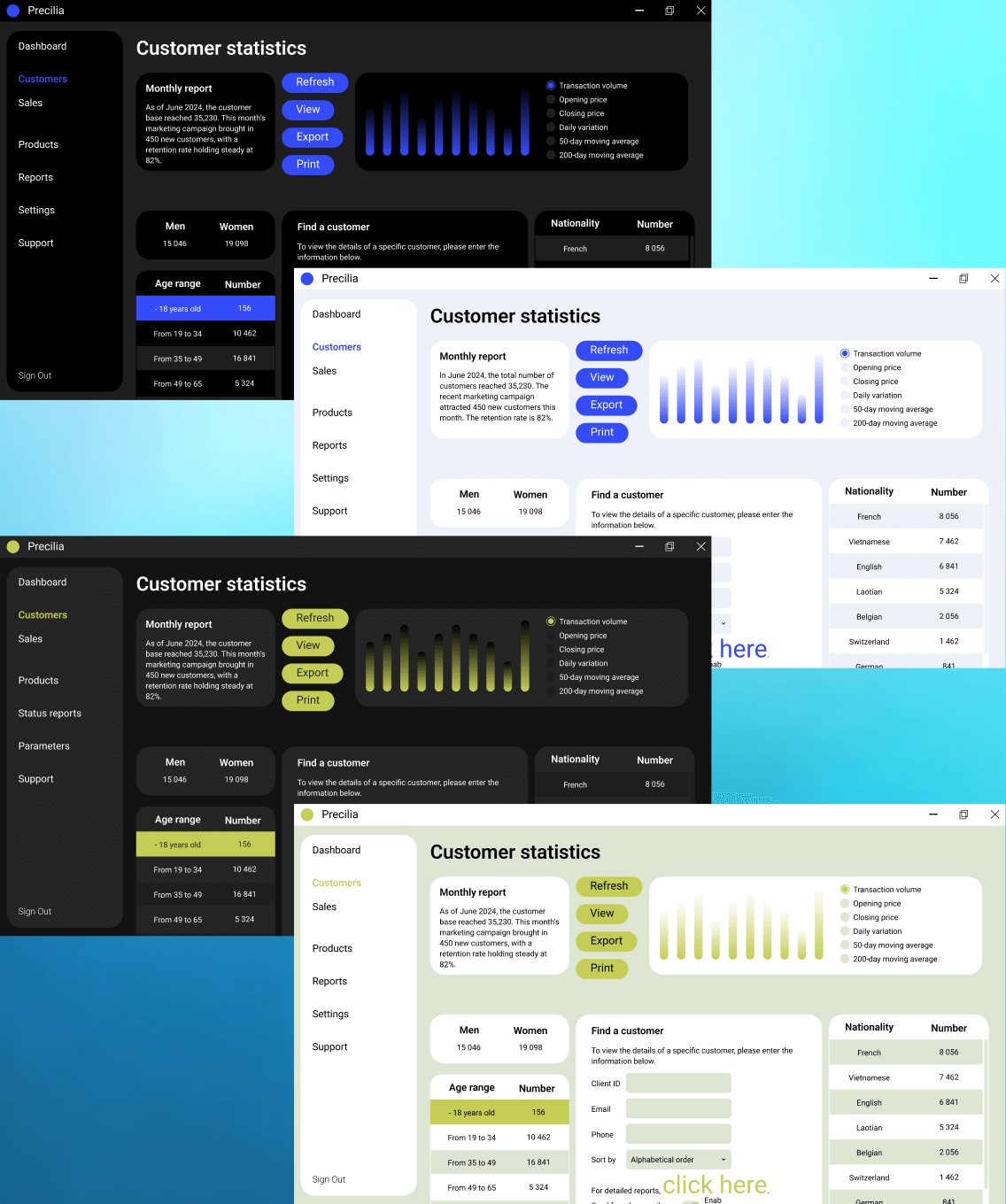
Version 2026 features many new color palettes.
This allows for new customization possibilities.
Feel free to use these palettes in your applications and software packages.
Remember you can dynamically switch between palettes, and even create your own.
WINDEV includes everything you need to create superb UIs.
Certificate-based signing using smart cards offers an additional authentication method.
This mechanism enables users to sign documents or data using a digital certificate stored on a smart card.
Some examples include health cards, professional cards, cryptographic cards, etc.
This method guarantees a secure signing process:
Security is guaranteed, as the private key never leaves the card.
All WLanguage functions for signing, such as PDFSign, XMLSign, etc., support certificates stored on smart cards.
Using the CertificateList function, the application retrieves all accessible certificates, including those on a smart card that is inserted in the reader.
You can then simply browse this list to select the certificate from the smart card, represented as a variable of type Certificate in WLanguage.


Google Maps is an extremely powerful and popular mapping service.
However, there are numerous other mapping platforms.
OpenStreetMap is the best-known alternative.
WINDEV, WEBDEV and WINDEV Mobile 2026 (Android apps) support OpenStreetMap.
You can easily choose the type of map in the 7-tab window of the control.
Please note that OpenStreetMap and Google Maps offers different functionalities.
Both solutions support gestures (zoom, move, etc.), and allow users to draw routes, shapes, points of interest, etc.
However, some automatic features are not available, in particular route planning and marker clusters.
In version 2026, the Map control also supports many other map formats:
The Map control now supports layers.
This makes it possible to overlap different maps on the screen.

WINDEV Mobile 2026 features an improved debugger for Android applications. The debugger can now run on an Android device (smartphone, tablet, industrial device) connected to the development computer over Wi-Fi.
To pair the device, simply specify its IP address in the debugger, and enter a one-time code on the device.
All debugger commands are available in Wi-Fi mode: step by step execution, trace, watch, breakpoint, etc.

In version 2026, WLanguage Organizer functions are available in Browser code.
This allows for faster processes in Organizer controls without leaving the browser.
New WLanguage Email functions have been added to take into account special cases.
The new WLanguage function EmailExecuteCommand enables you to send any command to a mail server.
The new EmailSubscribeToFolder and EmailUnsubscribeFromFolder functions allow you to subscribe to or unsubscribe from a folder to access its contents (IMAP protocol).
Version 2026 adds the MemoDisplay and MemoDownload functions to WLanguage.
In previous versions, the memo had to be downloaded to a memory buffer or to a file on disk and then sent to the browser using the StringDisplay or FileDownload functions.
In version 2026, the HFSQL memo is sent continuously, block by block. This method reduces memory consumption, speeds up the download process and reduces total download time on the end-user side.
The WLanguage InputMask type is used to programmatically implement input masks. In version 2026, this type of variable is available in browser code.
In version 2026, you can use the "=" operator between two arrays to compare their elements.
The "=" operator is applied recursively to all the elements in both arrays.